
小紅傘更新授權檔 Avira License File Update
1.下載小紅傘「授權檔」(檔名為hbedv2016.exe)。
Download Avira Professional Security License File.(The filename is hbedv2016.exe)
2.在hbedv2016.exe上點兩下,按[安裝],同一目錄下將產生一個hbedv2016.key的檔案。
Double click hbedv2016.exe, press [Install] to generate the file hbedv.key in the same folder.
3.在hbedv2016.key上點兩下。
Double click hbedv2016.key.
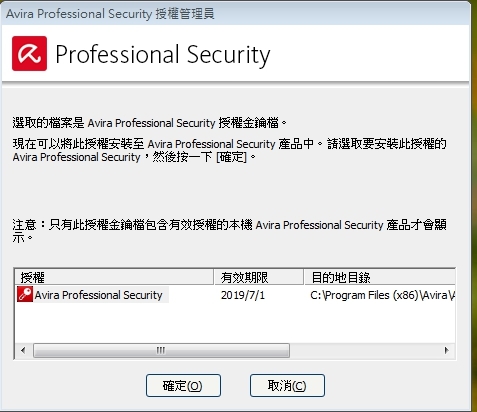
4.出現以下畫面,按[確定],即完成。
Click OK. Done!
如何確定更新成功?
How to make sure license has been updated?
1.點[開始]→[所有程式]→Avira→Avira Desktop→開始Avira Professional Security
Click [Start] -> [All Programs] -> Avira -> Avira Desktop -> Start Avira Professional Security
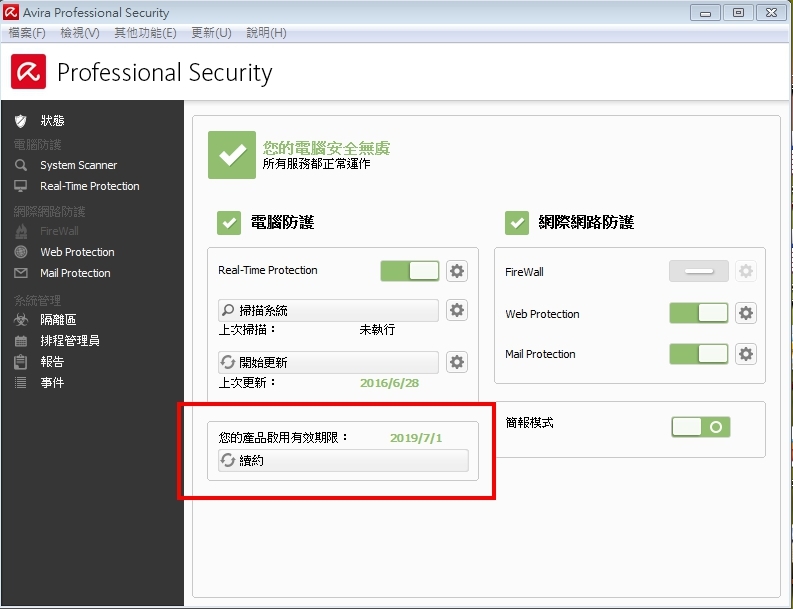
2.查看「您的產品啟用有效期限」應為2019/7/1。
Check "Your product is activated until: 7/1/2019".
3.出現「此程式可能未正確安裝」?
此為解壓縮金鑰的提示,請選「此程式已正確安裝」即可。
問題諮詢:
瀏覽數:
分享